
Trending Articles
What hours are doctors available through the Cedars-Sinai Connect app?
Doctors are available all hours, 7 days a week for patients located in the state of California. Primary Care appointments can be scheduled in advance based on available hours.
Can I update my phone number or email address in the Cedars-Sinai Connect app?
Account updates can be processed by request. If it is an urgent matter, please let us know. You can direct any update requests to our Care Concierge team at 323-471-0954
Are you able to provide work or school release forms?
Yes, CS Connect doctors can provide notes for work or school release after a visit has been completed. To reach a pediatric visit, you will need to navigate to the child’s account to access our pediatric service. Please review this article for more detailed information.
Will you delete my Cedars-Sinai Connect account upon request?
Yes, we can delete your Cedars-Sinai Connect account. Once requested, we will remove your app account and all identifiable information associated with it, within 30 days. If there are medical records associated with this CS-Connect visit, per State and Federal laws and guidelines, we are legally obligated to retain your health information and this data will not be deleted.
You can request deletion by contacting support here. If you are deleting an account to resolve a login or profile issue in the app, please let us know more about the problem and we'll see what we can do.
How do I access care for my child (ages 3-17) in the Cedars-Sinai Connect App?
Children (ages 3-17) are now able to access care through a parent or legal guardian’s Cedars-Sinai Connect account. Services for pediatric patients are limited to select acute care issues. As a parent or legal guardian, you can add a child to your account by selecting “Add Child” from the dropdown menu on the Home screen or “View Children” from your Profile screen. Your parent account must first be created before adding a child account to your profile. You can choose between syncing an existing child account from My CS-Link (Cedars-Sinai’s electronic health record) or adding an account manually by completing the short form. Once the child has been added to your account, you can initiate a visit by clicking “Get Care Now” on the home screen. The parent/ legal guardian should communicate on the child’s behalf during the chat portion of the visit. Both the child and their parent/ legal guardian will need to be present during the virtual consultation.
In which states is the Cedars-Sinai Connect app available?
Cedars-Sinai Connect providers are licensed to practice in California only. Because of this, the app is only available within the state of California at this time. If you are a California resident, but are currently located in another state, service will not be available.
How do I turn Cedars-Sinai Connect notifications on or off?
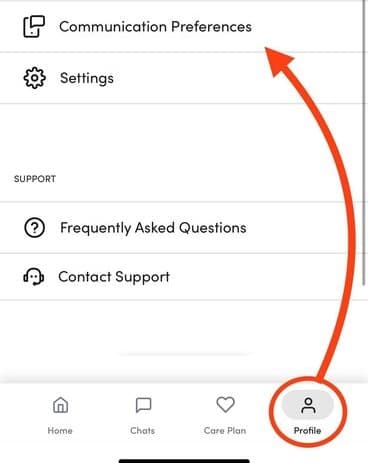
If you need to adjust notification settings in the Cedars-Sinai Connect app, log into your account in the app and select the Profile tab on the lower right corner of the screen. You should see a Communication Preferences option in your account settings:
Tapping Go to Settings will take you to the notification settings on your phone:
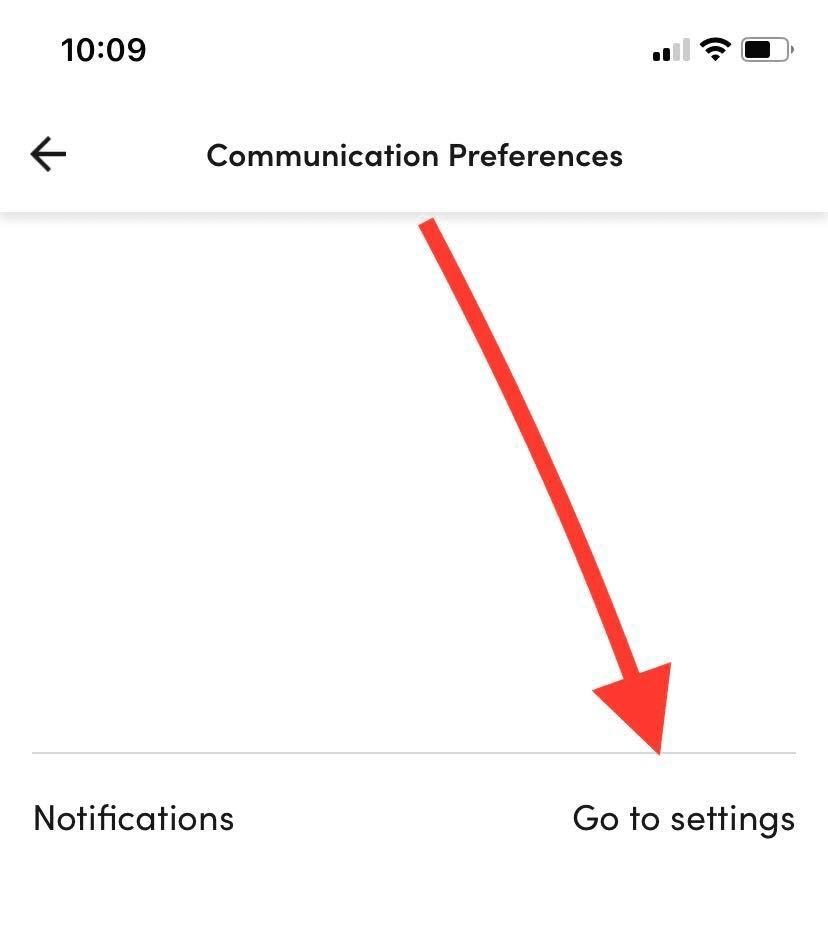
This will turn off notifications for the Cedars-Sinai Connect app only - you will still receive notifications from the Cedars-Sinai app.
Which patients can be seen by Cedars-Sinai Connect?
Cedars-Sinai Connect covers most sick care conditions and mild-moderate complexity primary care conditions. Sick care services will cover ages 3 and up and primary care services will cover adults aged 18 and up. Behavioral health services are provided to adults suffering from mild-moderate anxiety and depression through primary care providers. This service will be available to all patients utilizing the application in California. There are several guardrails to ensure that Cedars-Sinai Connect providers are managing conditions that are safe to manage via chat and video.
How do I switch between my own CS-Connect account and my child’s?
If you’ve added one or more children to your account, you can use the dropdown menu at the top of the Home page to switch profiles. Before initiating a visit, please make sure the correct profile is selected.
How does pediatric proxy access change based on my child’s age?
Parents and legal guardians are granted full proxy access to their child's account through age 11. Once your child reaches the age of 12, both you and your child will be asked to attest to a Proxy Access and Authorization Form. This enables the parent/legal guardian access to the CS Connect visit information. This form is collected once upon profile setup and again at the beginning of every visit. When your teen turns 18, they will need to establish their own CS Connect account to access care. Currently, you cannot move any existing historical data from a parent account to a different account. Therefore, the 18-year-old will need to complete all initial forms and go through the process of proving their identity in their new account.
What is pediatric proxy access and how does it work in CS Connect?
Pediatric proxy access allows for the parent/legal guardian to view a child’s health information in the electronic medical record. In California, there are limitations to the information that the parent/legal guardian can view for teens ages 12-17 years. A proxy consent form, signed by the teen and parent, will enable limited proxy access. CS Connect offers acute pediatric visits virtually through the parent’s or legal guardian’s account. The visit is conducted with both the parent/legal guardian and the child present. Certain conditions are protected by the California Confidentiality of Medical Information Act (CMIA) State Laws and may need to be redirected to a brick-and-mortar setting by our providers during the visit. Once the proxy consent is signed and the visit is complete, the parent will have access to the visit information in the CS Connect app.
How much does it cost to use Cedars-Sinai Connect?
You can pay for virtual visits on the Cedars-Sinai Connect app using your health insurance. We collect co-payments and/or co-insurance in accordance with your insurer’s policy on telehealth consultations and services. Most major insurers are accepted. Please check with your insurer if you have any questions.
I can't log into the Cedars-Sinai Connect app
If you are trying to log into the app, but keep getting redirected to our website, the following steps have been known to resolve this issue:
Turn your phone completely off then turn it back on
Delete the CS Connect app and reinstall
Delete all verification emails from previous login attempts
Attempt to login again through the app
If you are still unable to log in, please try the following:
On your mobile device, open the email containing the Verify button
Find the URL (web address) in the email and hold down on the link to open a dropdown menu
If the option to Open CS Connect appears in the menu, select it. If it doesn’t:
Select Copy from the menu instead and Paste into your phone's Notes or Google Keep app.
Hold down on the link and select Open CS Connect
If after following both sets of instructions you are still unable to access the app, please contact support and share the type of mobile device you are using as well as its current software version.
How is Cedars-Sinai Connect different from My CS-Link?
Cedars-Sinai Connect is a convenient way to access virtual primary and urgent care from anywhere in California. My CS-Link is an online portal that helps you communicate with and schedule appointments with your in-person Cedars-Sinai medical providers. In My CS-Link, you can also view and pay your bills for both in-person and virtual care.
Can I access Cedars-Sinai Connect on my tablet or computer?
The Cedars-Sinai Connect app is designed for smartphones and is available for both iOS and Android phones. If you have a tablet that’s synced with your phone, you will see the app on your tablet, but we recommend only accessing Cedars-Sinai Connect on your phone for the best user experience. The app is not available for use on a computer.
Is Cedars-Sinai Connect linked to the in-person Cedars-Sinai patient experience?
Yes! The Cedars-Sinai Connect app is part of the extended Cedars-Sinai spectrum of care, making it simple for you to return to a clinic whenever you need to see a provider in person. The clinic will already have your health history from the app.
Who will I be talking to on the app?
During all virtual visits on the app, you’ll speak with a Cedars-Sinai medical provider. You can also message with your dedicated care team, which includes both providers and non-clinical staff who are there to help you with non-medical questions you may have.
Will my information be shared with anyone?
Your information and chats on the app will be documented in your digital health record and can be accessed by your Cedars-Sinai healthcare providers when needed.
How do I log into the Cedars-Sinai Connect app?
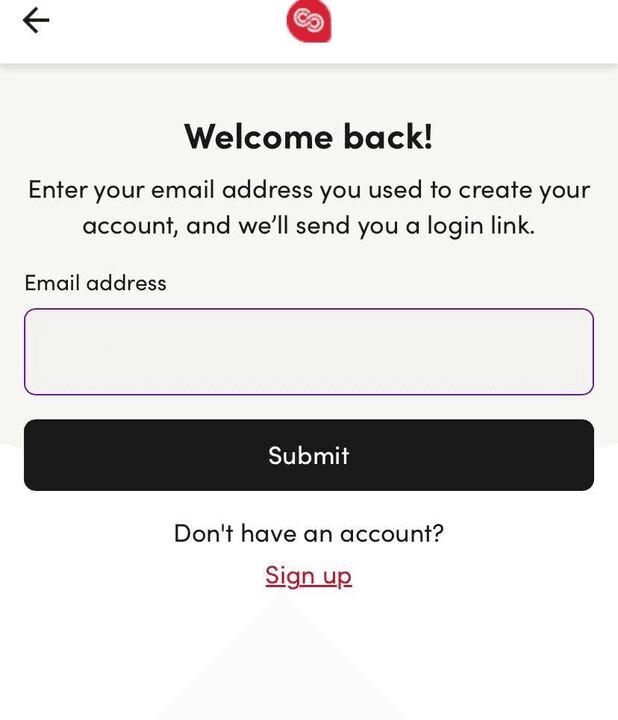
When you log into the Cedars-Sinai Connect app, you'll be asked to enter your email and click Submit:
Once you submit your email address, check your email inbox on the same device the app is downloaded to. You should receive a message with a verification link within 5 minutes (at most) of entering your email:
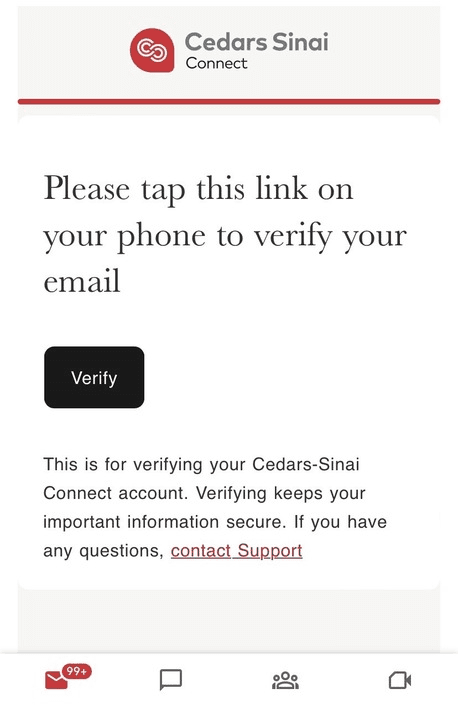
Click the Verify button and you will be logged into the app. If you don't receive an email with the link, please check your Spam folder to see if it ended up there.
How do I turn on my camera or microphone for a video visit?
While our medical service is primarily chat based, the doctor may need to a short video visit during your consultation. If you encounter issues accessing the microphone or camera on your phone during a video visit, go to your phone's Settings page: For iPhone, scroll through Settings until you find your phone's default browser (usually Safari) and click. You should see options to update the Camera and Microphone permissions by selecting Allow Access. For Android, scroll through Settings until you find Camera or Microphone and click. From the Camera or Microphone menu, you should be able to find your phone's default browser (usually Chrome) and select Allow Access.